

FAQ
The most asked questions. For any further question please reach us at info@techarena.se.

Tickets

up to -25%
You can see which ticket type you have at the homepage of the event platform or via the email titled "Techarena 2026 - Ticket Confirmation" → "View and Assign Passes".
up to -25%
You can find your ticket in the app via Menu bar → "My Ticket QR Code" or search for an email titled "Techarena 2026 - Ticket Confirmation". At the entrance you scan this QR code and show your ID to get the wristband & badge required for entry.
If you can't find the email, check your spam folder and any other email addresses you may have used. If someone else was meant to send you a ticket, confirm with them. If you're sure a ticket is registered in your name, there may be a typo in your email. We can find you at the entrance and admit you without a QR code, but this may take extra time.
up to -25%
You can change everything except the email address in the app via Menu bar → "Ticket Management". You can find the registration ID required via the email we sent titled "Welcome to the Event Platform - Techarena 2026".
up to -25%
You claim your wristband and badge by scanning your Ticket QR code & show ID. You can do so before & during the event at the following checkpoints and time slots:
The Arena Entrance, located at Strawberry Arena
Tuesday 10/02, 14:00–19:30 (skip the queue)
Wednesday 11/02, 08:15–16:30
Thursday 12/02, 08:15–16:00
The Box, located in front of the Mall of Scandinavia
Tuesday 10/02, 12:00–20:00 (skip the queue)
Wednesday 11/02, 08:15–14:00
Those joining Investor Day will get their wristband & badge on entry into the venue on Tuesday 10/02.
up to -25%
If you need to change your email address you need to reach out to support@techarena.se or Helpdesk at Entrance A of the Arena.
up to -25%
To request a ticket transfer, please email support@techarena.se with the new ticket holder(s) on cc and the following information:
Email address of the current ticket holder(s), as well as First name, Last name, Email address, Company, Job title & Country of Residence of the new ticket holder(s).
If you do not get a transfer confirmation before the event, the new ticket holder(s) can present the above email as proof of transfer intent at Helpdesk (Entrance A). We will then process the transfer on site and grant access to the event.
up to -25%
No, tickets are strictly personal. Once one person has checked into the event and gotten their wristband & badge the ticket is redeemed. This means that the ticket can NOT be split between the days.
up to -25%
You can email support@techarena.se or go to Helpdesk at Entrance A during the event.
up to -25%
Make sure to know which ticket type you have & have your QR code ticket + ID prepared. If you want to avoid the queue for entry on the first day you can claim your wristband & badge before the event (see question "How can I claim my wristband & badge?").
up to -25%
In your confirmation email titled "Techarena 2026 - Ticket Confirmation" there's a button to download the receipt. If you have specific requests for the receipt please email support@techarena.se & we will answer you after the event.
up to -25%
We do not offer refunds, but are happy to assist in transferring your ticket to someone else (see question "How do I transfer a ticket?").
Arrival
up to -25%
You can easily travel from Stockholm Central Station with commuter train line #41 towards "Märsta" or "Upplands Väsby", or line #40 towards "Uppsala C". You will get off at "Solna". The train ride is 7 minutes. From the stop there is a 14 minute walk to the Arena – you walk through Mall of Scandinavia.
To buy tickets for the train you can download the "SL" app or pay on site by tapping your payment card. If you wish to go by car from central Stockholm it takes about 15 minutes to get to the Arena.
You can also reach the Arena by subway (blue line to Näckrosen or Solna centrum), bus, or tram. For detailed routes, visit sl.se.
up to -25%
Techarena 2026 takes place at Strawberry Arena on Råsta Strandväg 1, 169 79 Solna.
Here you can find the exact location for entry on Google Maps: Entry to the Arena
up to -25%
Here are your accommodation options:
Nobis Hotels (Stockholm)
Stay centrally with premium amenities.
Elite Hotels (Stockholm)
Select from multiple locations across the city.
up to -25%
At Strawberry Arena (Feb 11–12):
Arena: 8:15 AM – 6:00 PM
Meetings & Side Events: 9:00 AM – 6:00 PM
Stage program: 09:30 – 5:00 PM
up to -25%
No, in order to enter the Arena you need a valid Techarena ticket.
up to -25%
At the Arena you can join Side Events, Roundtables & Networking Labs, get inspired by the Stage program, visit Startup & Scaleup booths, Ecosystem booths, and Company booths, as well as book meetings via the app for our matchmaking area.
up to -25%
Bring your ticket & valid ID to enter the Arena (see question "Where can I find my ticket?").
To get the most out of the event, sign up to the event platform and download the app (see question "How do I access the event platform?"). Once set up you can plan your stage program, request meetings, sign up for side events & more.
At the Arena
up to -25%
There will be many food options at the Arena where you can buy lunch or snacks.
up to -25%
Yes, there are lounges for certain ticket groups. There will be workspaces available & you can also use the 55 000 seats in the bleachers.
up to -25%
Yes.
up to -25%
No, as we serve alcohol in the Arena the age limit is 18.
up to -25%
Suitcases and bigger bags such as backpacks are not allowed on the Arena floor. You can check them in the cloakroom, subject to availability. We do not take responsibility for the bags.
up to -25%
Yes. Winter jackets should be handed over at the cloakroom.
up to -25%
Yes, you can see the map here.
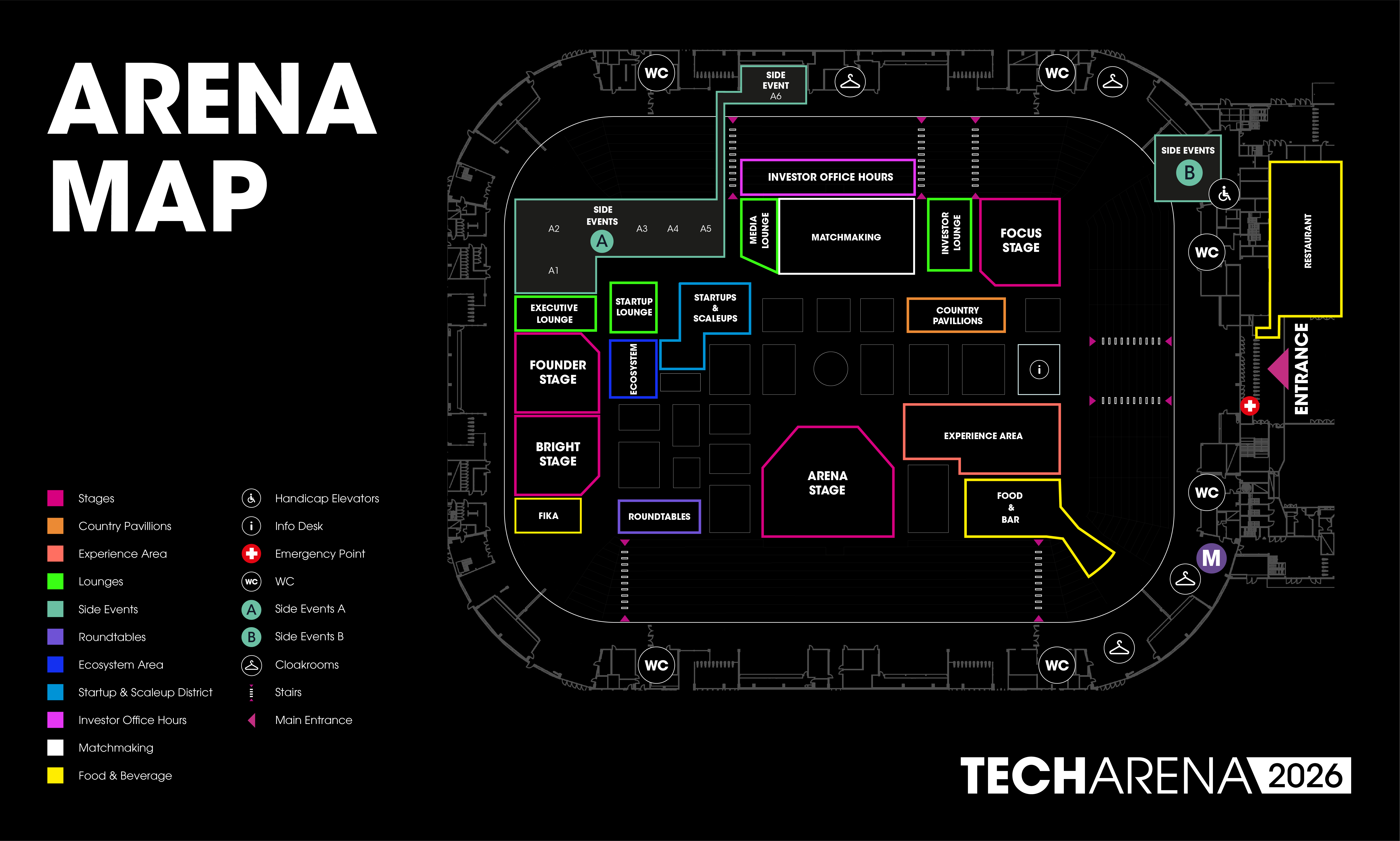
The map is also available in the app via Menu bar → "Map".
up to -25%
During the event you can get support at:
Helpdesk for ticket assistance – at Entrance A
Infodesk for guidance – on the Arena floor
up to -25%
No, there is no option to pre-book meeting rooms, but you will be able to use workspaces found throughout the Arena.
up to -25%
Yes. The venue and food courts only accept credit/debit cards. No cash payments are possible.
Event Platform
up to -25%
The event platform is used to organize all activities for the event. This includes agendas for the Stage program, Roundtables, Side Events & Networking Labs. It's also where you can find your ticket and the matchmaking platform.
up to -25%
In the event platform via "Schedule" you can see all meetings and if they are pending, accepted or denied.
up to -25%
Your login credentials for the event platform were sent in an email titled: "Welcome to the Event Platform - Techarena 2026". Please search for this in the inbox and spam folder.
Once registered you can download the app "Techarena" and/or use the desktop version to start exploring the event. You can access the event-platform on this link. If your password does not work, request a new one to the email address you registered your ticket with.
up to -25%
Via Menu bar → "Matchmaking" in the app you can filter on which contacts you are interested in and request meetings directly. We have a dedicated "Matchmaking Area" where you can meet these new connections.
Agenda
up to -25%
At the Arena you can join Side Events, Roundtables & Networking Labs, get inspired by the Stage program, visit Startup & Scaleup booths, Ecosystem booths, and Company booths, as well as book meetings via the app for our matchmaking area.
up to -25%
Via Menu bar → "Side Events" you are redirected to our Side Event Calendar on Luma. Here you can browse the different Side Events and request a spot. The specific host of that event will then email you with a confirmation or denial email for that specific event.
Techarena does not have access to or influence over attendee lists for specific Side Events, besides from those hosted by Techarena.
up to -25%
Each host is in charge of sending out confirmation emails to their attendees. Techarena does not have access to or influence over attendee lists for specific Side Events, besides from those hosted by Techarena.
Some confirmation/denial emails will be sent momentarily, others might be sent close to the event or not at all. Unless you have received a confirmation email, you do not have a spot.
up to -25%
Via "Schedule" in the app.
up to -25%
Yes, Side Events that occur outside of the Arena do not require a Techarena ticket.
up to -25%
On the event platform via Menu bar → "Stage Agenda".
up to -25%
On the event platform via Menu bar → "Roundtables".
up to -25%
Some are open to all, others require specific registration. This is decided by the host.
up to -25%
No, in order to enter the Arena you need a valid Techarena ticket.
up to -25%
On the event platform via Menu bar → "Networking Labs".
General
up to -25%
As a volunteer you get a free ticket to the event. Read more and apply HERE.
up to -25%
Feel free to generate your own Social Media Badge HERE.
up to -25%
No, Techarena is a fully physical event. There will be no livestreams available.
up to -25%
Most of our attendees dress "business casual". Stockholm in February is typically between -6°C and 4°C. Bring warm clothes and winter gear. The Arena is heated, so jackets can be left at the cloakroom.
up to -25%
Weapons, drugs, glass bottles, professional filming equipment (without approval), aerosol sprays, portable speakers, and unapproved promotional materials.
up to -25%
No, we do not offer any discounts.
up to -25%
No, we do not offer student discounts, but a lot of students join as volunteers. As a volunteer you get a free ticket to the event. Read more and apply HERE.
up to -25%
Reach out to partner@techarena.se and we can start the discussion for 2027.
up to -25%
No, you are not allowed to bring a rollup or similar promotional material to the event.